
COLUMN
How to Self-Host Next.js Image Optimization in Production
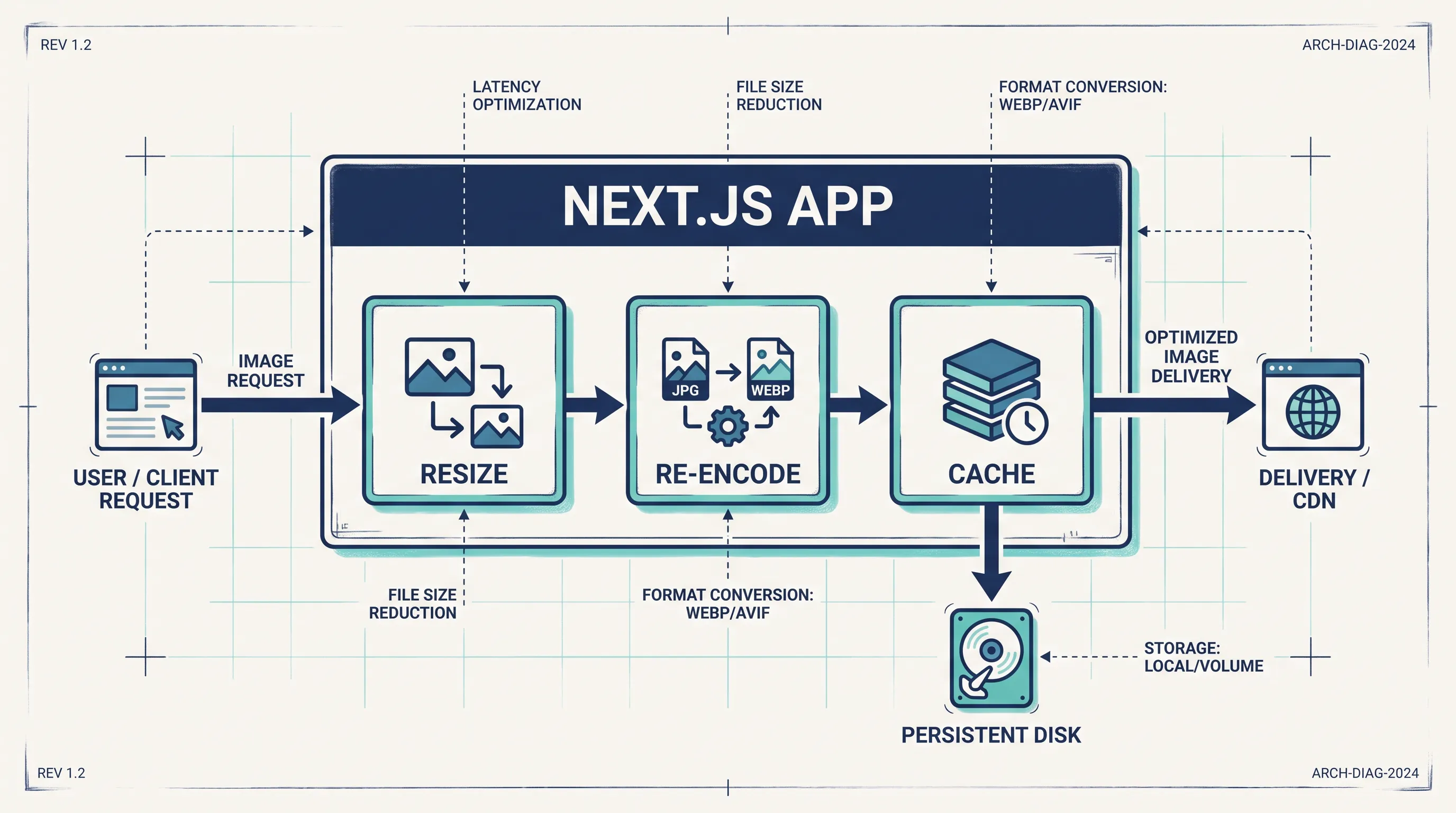
Next.js ships with built-in image optimization: next/image resizes, re-encodes, and caches images on demand, and on Vercel it just works. Self-host the same app — on a VPS, in Docker, or on Kubernetes — and the built-in optimizer suddenly becomes one of the trickiest parts of the deployment. This guide covers what actually breaks and how to fix it.
Why next/image behaves differently off Vercel
next/image doesn't just add a srcset. By default, it runs a server-side optimizer that decodes, resizes, and re-encodes every image the first time it's requested at a given size, then caches the result. On Vercel, that optimizer runs as a managed function with its own scaling and caching layer. Outside Vercel, Next.js falls back to its own built-in image server — and that server has real infrastructure requirements most teams don't plan for.
Three things trip people up almost every time:
- The optimizer depends on
sharp, a native Node.js addon, which has to be compiled for the exact platform it runs on - Optimized images are cached to disk by default, which doesn't survive container restarts or work across multiple replicas
- Remote images need to be explicitly allow-listed, or every request 400s
Install sharp — and make sure it's the right binary
Next.js will use sharp automatically if it's present, and strongly recommends installing it yourself in production:
npm install sharp
The failure mode to watch for is building on one architecture and running on another — for example, building a Docker image on an Apple Silicon laptop (arm64) and deploying it to an amd64 node. sharp ships prebuilt binaries per platform, and npm install on the build machine won't fetch the one your production container needs unless the build itself happens on that architecture.
If you build with Docker, build for the target platform explicitly:
docker buildx build --platform linux/amd64 -t my-app:latest .
If sharp can't find a matching binary at runtime, Next.js doesn't always fail loudly — you'll often just see optimization silently skipped or requests hanging until they time out. If images that worked locally start returning errors only in your container, check the sharp install log for the target platform first.
remotePatterns: the config that silently blocks production images
In development, next/image will happily load anything. In production, any external image source has to be explicitly declared in next.config.js, or the request fails with a 400:
// next.config.js
module.exports = {
  images: {
    remotePatterns: [
      {
        protocol: 'https',
        hostname: 'cdn.example.com',
        pathname: '/uploads/**',
      },
    ],
  },
}
This is a deliberate security control — the Next.js documentation is explicit that it exists to stop the optimizer from being used as an open proxy for arbitrary URLs, which is a real abuse vector for a public-facing image resizing endpoint. The practical implication for a self-hosted deploy is that every image source — including staging buckets, a CMS's media host, or a customer's own domain in a multi-tenant app — has to be added deliberately. It's worth auditing this list whenever a new image source is added anywhere in the app, since a missed entry only surfaces in production, not in local development.
The cache directory has to be a real, persistent path
By default, optimized images are cached under .next/cache/images on the local filesystem. That's fine for a single long-running server. It breaks in two common self-hosted setups:
- Multi-replica deployments (Kubernetes, ECS, multiple containers behind a load balancer): each replica has its own disk, so every replica re-optimizes the same image independently, and cache hit rates collapse
- Ephemeral containers: if the container is rebuilt or rescheduled, the cache directory disappears and every image is re-optimized from scratch on the next request
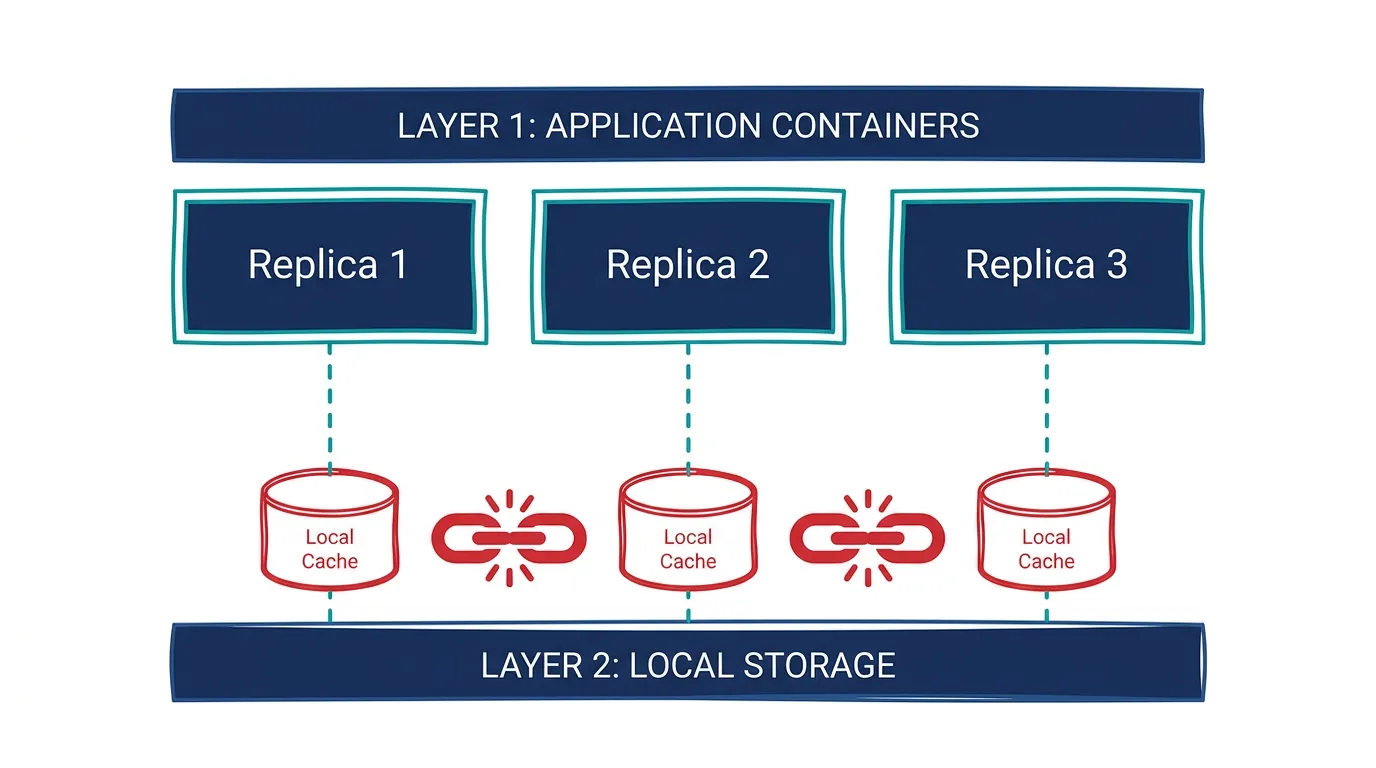
There's no built-in shared-cache mode for self-hosted next/image — the two practical options are a persistent volume mounted at the same path across replicas, or putting a CDN in front of the app so re-optimization only happens once per image variant regardless of which replica served the miss. If you're already running on Kubernetes, this is the point where Kubo becomes relevant: a persistent volume claim shared or synced across replicas — or a small object-storage-backed cache — is the standard fix, but wiring that up from scratch (storage class, mount, cache invalidation) is exactly the kind of plumbing that eats a day if you're setting it up for the first time.
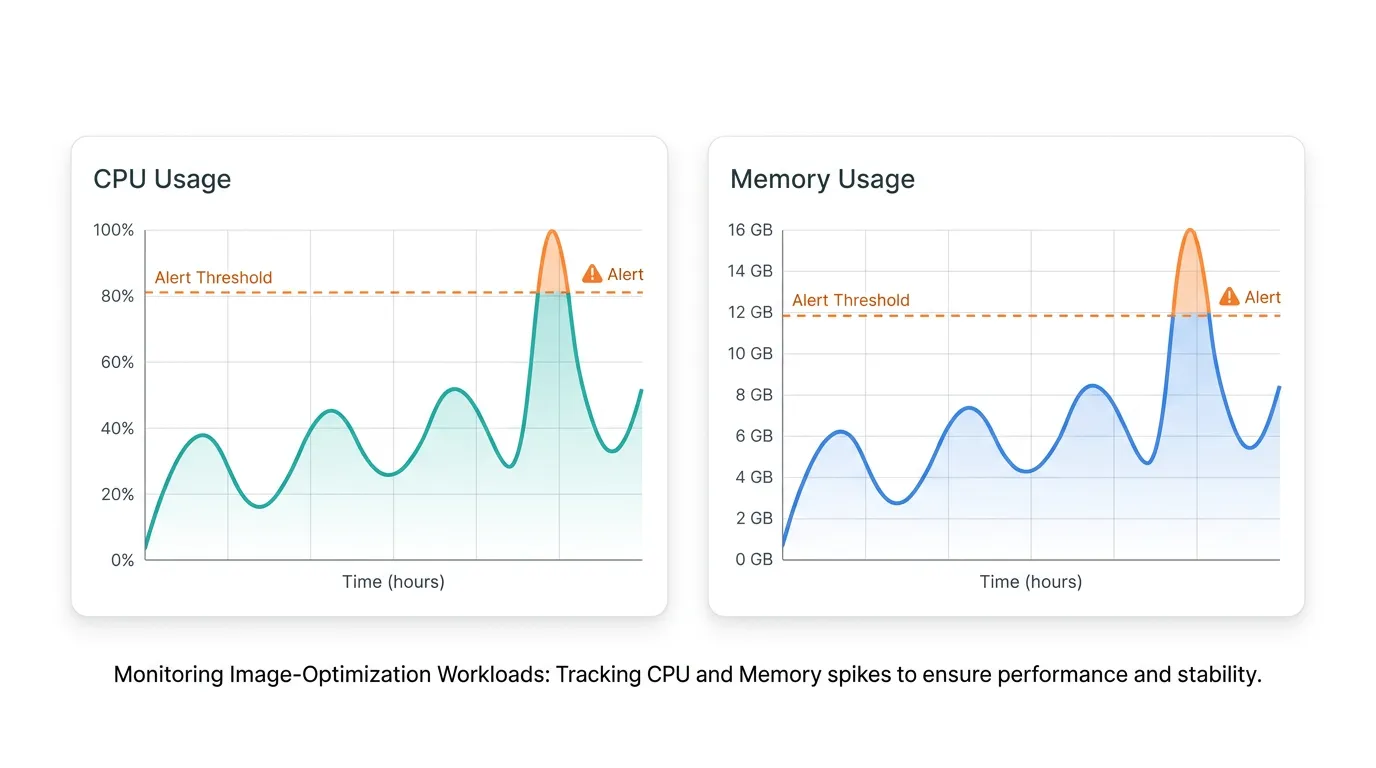
That's also the moment resource planning stops being optional. Decoding and re-encoding images is CPU-bound, and a traffic spike that hits many uncached image variants at once can spike CPU and memory on every replica simultaneously — worth right-sizing CPU-heavy workloads like image processing before it happens in production rather than after a bill or an outage tells you about it.
When to bypass the built-in optimizer entirely
For some deployments, the simplest fix is to not run the optimizer at all. Setting a custom loader hands image URLs to an external service instead:
// next.config.js
module.exports = {
  images: {
    loader: 'custom',
    loaderFile: './lib/image-loader.js',
  },
}
// lib/image-loader.js
export default function cloudflareLoader({ src, width, quality }) {
  return `https://your-cdn.example.com/cdn-cgi/image/width=${width},quality=${quality || 75}/${src}`
}
This trades the operational cost of running sharp yourself for a dependency on an external image CDN (Cloudflare Images, Cloudinary, imgix, and similar services all support this pattern). It's the right call when image traffic is large enough that a dedicated CDN is already in the budget, or when the team doesn't want to own image-processing infrastructure at all. For lower-traffic apps, the built-in optimizer with a properly mounted cache volume is usually simpler to operate.
If you've already containerized the rest of the stack — the app, a database, maybe a queue — in Docker Compose, and image optimization is the piece forcing you to think about shared volumes and multiple replicas, that's usually also the point where moving from a single container to an orchestrated setup starts to make sense, since the same primitives (persistent volumes, replica scaling) solve the image-cache problem and the rest of the app's scaling needs at once.
Watch it in production before it becomes an incident
Once the optimizer is running self-hosted, treat it like any other CPU-bound service: a burst of cache misses (a deploy that clears the volume, a new page with lots of unique images) can spike CPU and memory across every replica at the same time. It's worth keeping an eye on CPU and memory for image-processing pods specifically, rather than only watching aggregate app metrics — image optimization load doesn't always correlate with request count, and a memory-pressured pod serving images will degrade before your general error rate does.
The short version
Self-hosting next/image isn't harder than self-hosting the rest of a Next.js app — it just has its own three failure points: the sharp binary has to match your runtime platform, remotePatterns has to list every real image source, and the cache directory needs a persistent, shared location once you run more than one replica. Get those three right and the built-in optimizer works about as well outside Vercel as it does on it.
If you're weighing whether to keep building this plumbing yourself or move the whole deployment onto a platform that already handles persistent volumes, scaling, and monitoring for you, that's a decision worth making deliberately rather than one node at a time.