
COLUMN
16/10/2026
Next.js Web Applications: How They're Actually Built and Deployed in Production
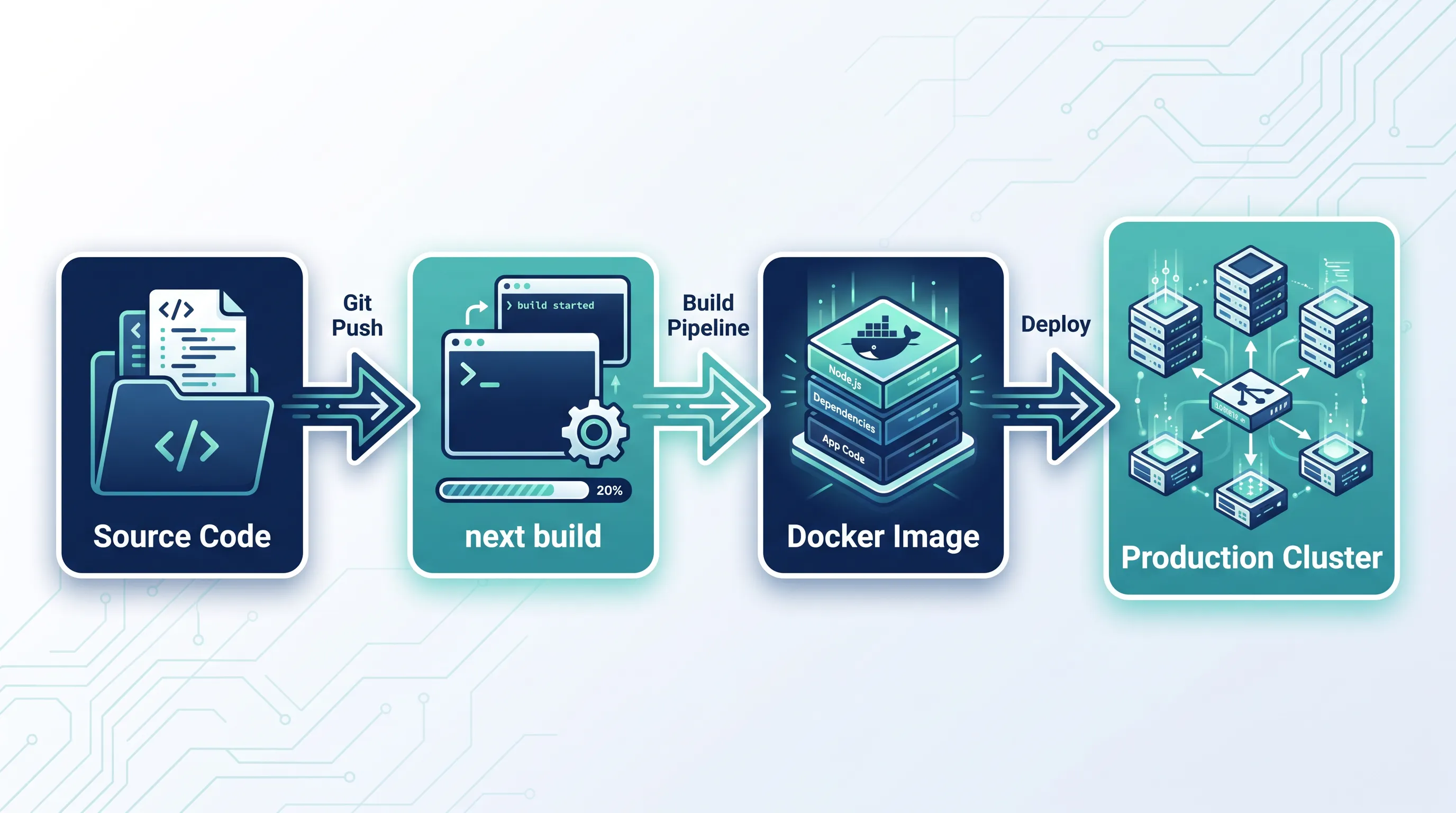
Your Next.js app runs fine on next dev. It also runs fine when you click deploy on Vercel. Somewhere between those two facts is a question most teams never actually answer: what does "running in production" mean for a Next.js app, mechanically? You've got a Next.js app running locally — but "it builds" and "it runs the same way every time in production" are two different claims, and the gap between them is exactly what this guide covers.
What next build actually produces
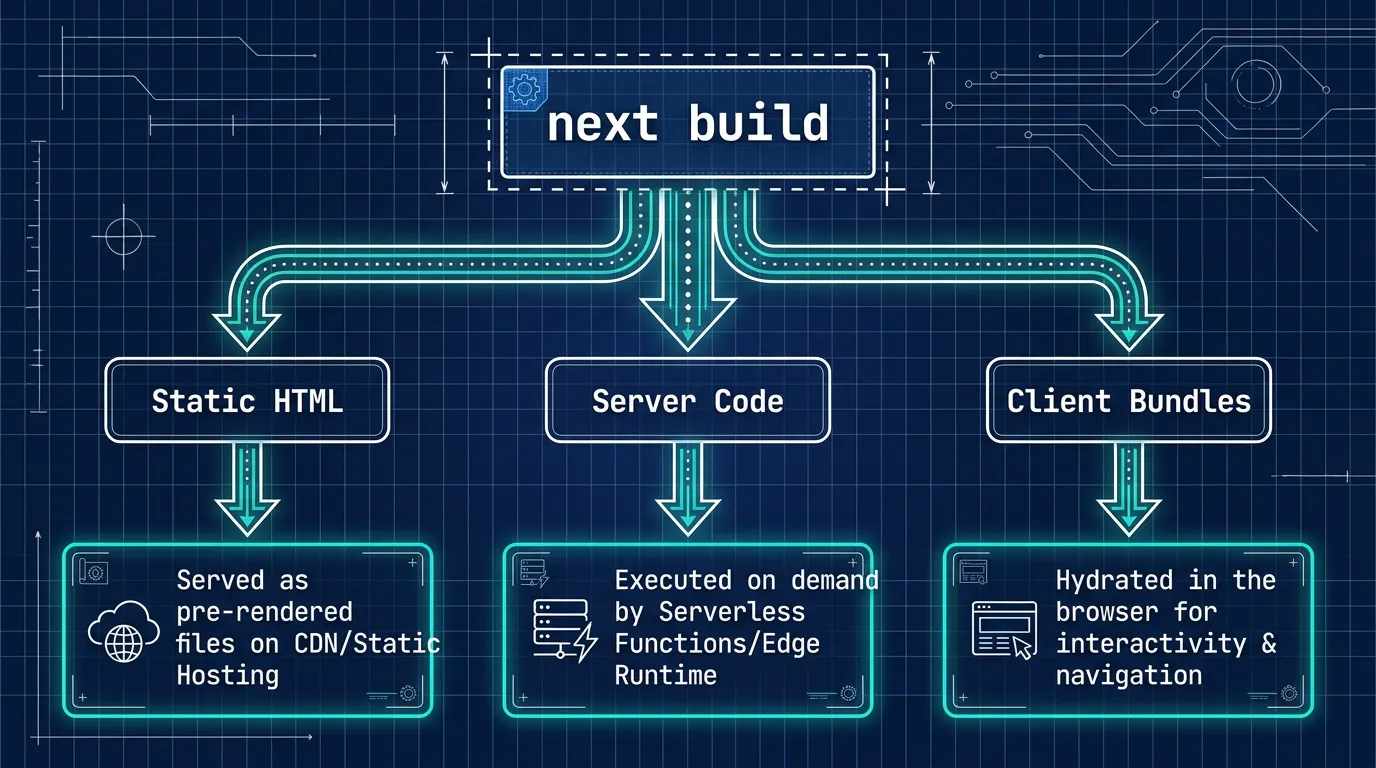
next build compiles your routes, bundles client-side JavaScript, and pre-renders whatever pages it can ahead of time. The output lands in .next/, and it's not one artifact — it's several, with different lifetimes:
- Static HTML and JSON for pages that use static generation, written once at build time.
- Server code for pages that render on each request (Server Components,
getServerSideProps, route handlers). - Client bundles — the JavaScript the browser downloads, chunked by route.
- Build manifests that map routes to the files above, so the runtime knows what to serve.
The default .next/ output assumes you'll run next start from a full node_modules install. That's fine for a single VM, but it's a bad fit for anything you want to containerize, because node_modules for a typical Next.js project is 200–400 MB of mostly-unused transitive dependencies.
Rendering mode decides where the work happens
Before packaging any of this, it's worth being precise about what each rendering mode actually ships:
- Static Site Generation (SSG) — HTML is generated at build time and served as-is. No server work per request.
- Server-Side Rendering (SSR) — HTML is generated on every request, on your server. This is where "your server" has to actually exist and stay up.
- Incremental Static Regeneration (ISR) — static HTML that regenerates in the background after a
revalidatewindow expires, via therevalidateoption infetch()calls or page config. - React Server Components (RSC) — components that render on the server and send a serialized payload to the client, reducing client JavaScript for data-heavy UI.
SSG pages need nothing but a file server. SSR and RSC need a long-running Node process that can execute your route handlers on demand. That distinction is the whole reason "static hosting" and "Next.js hosting" aren't interchangeable once SSR enters the picture.
Most real applications mix all four. A marketing page might be fully static, a dashboard might be SSR because it depends on the logged-in user, and a product page might use ISR so it's fast to serve but still reflects a price change within a minute. The build step has to account for every mode present in the app, which is why .next/ ends up with both static files and server code side by side rather than one or the other.
Packaging the server: output: 'standalone'
For anything beyond static export, you need a Node process that can run independently of your full source tree. Next.js has a built-in answer for this:
// next.config.js
module.exports = {
  output: 'standalone',
}
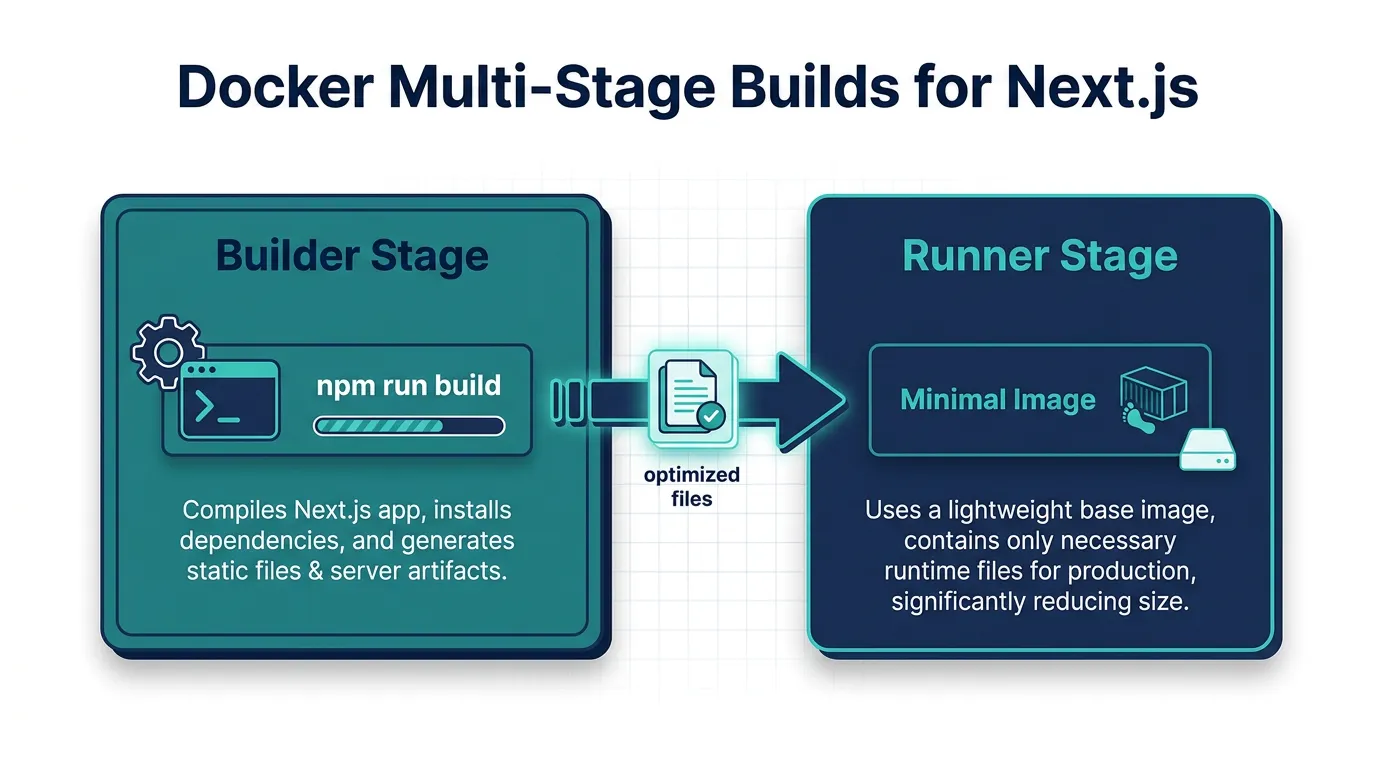
With this set, next build writes a .next/standalone directory containing a minimal server.js and only the node_modules your app actually traces as dependencies — not your whole lockfile. It does not automatically copy your public/ folder or .next/static, so a typical Docker build copies those in explicitly:
FROM node:20-alpine AS builder
WORKDIR /app
COPY . .
RUN npm ci && npm run build

FROM node:20-alpine AS runner
WORKDIR /app
COPY --from=builder /app/.next/standalone ./
COPY --from=builder /app/.next/static ./.next/static
COPY --from=builder /app/public ./public
EXPOSE 3000
CMD ["node", "server.js"]
This two-stage build is the difference between a 1 GB image with your entire dev toolchain baked in and a runtime image that's often under 150 MB. Once that image is built, the next question is what's inside it — not just in terms of size, but in terms of risk. Kubo users scanning that image for vulnerabilities before it ships catch a surprising number of issues that npm audit alone misses, since npm audit only looks at your JavaScript dependency tree and says nothing about the base OS packages layered underneath. A minimal node:20-alpine base cuts that surface down considerably, but it doesn't eliminate it — the Node runtime itself and whatever system libraries it depends on still need to be tracked and patched.
What's actually serving requests at runtime
Once node server.js is running, a few things are true that aren't obvious from local development:
- Environment variables are read at request time for server code, but anything prefixed
NEXT_PUBLIC_was already baked into the client bundle at build time. Changing it after the build does nothing until you rebuild. - There is no "serverless function per route" anymore in this setup — it's one long-running Node process handling every server-rendered route, which is both simpler to reason about and means a slow route can affect others sharing the same process.
- Caching that Vercel handles transparently (the Data Cache, ISR revalidation) has to be backed by something when you self-host. Next.js supports a custom cache handler via the
cacheHandleroption innext.config.jsfor exactly this reason — without it, ISR falls back to the local filesystem, which doesn't survive a restart or work across multiple replicas.
That last point is the one that catches teams off guard: a self-hosted Next.js app behind a load balancer with more than one replica needs a shared cache backend, or each replica will regenerate ISR pages independently and serve inconsistent content.
There's a second, quieter gotcha in the same area: revalidate windows and on-demand revalidation via res.revalidate() or revalidatePath() only work against the cache the running process can see. If replica A serves the revalidation request and replica B still has the old entry in its own local cache, B keeps serving stale content until its own window expires. This is invisible in local development, where there's exactly one process and one cache, which is exactly why it tends to surface for the first time in production.
From one container to several
A single node server.js process handles a surprising amount of traffic, but it has one glaring limit: it's one process on one machine. The moment you need more than that — multiple replicas for availability, rolling deploys without downtime, or autoscaling for traffic spikes — you're no longer deploying a container, you're operating a fleet of them. That's a different job: health checks so a broken replica gets pulled from rotation, a shared cache backend so ISR doesn't diverge between replicas, and a way to roll out a new image without a gap in traffic.
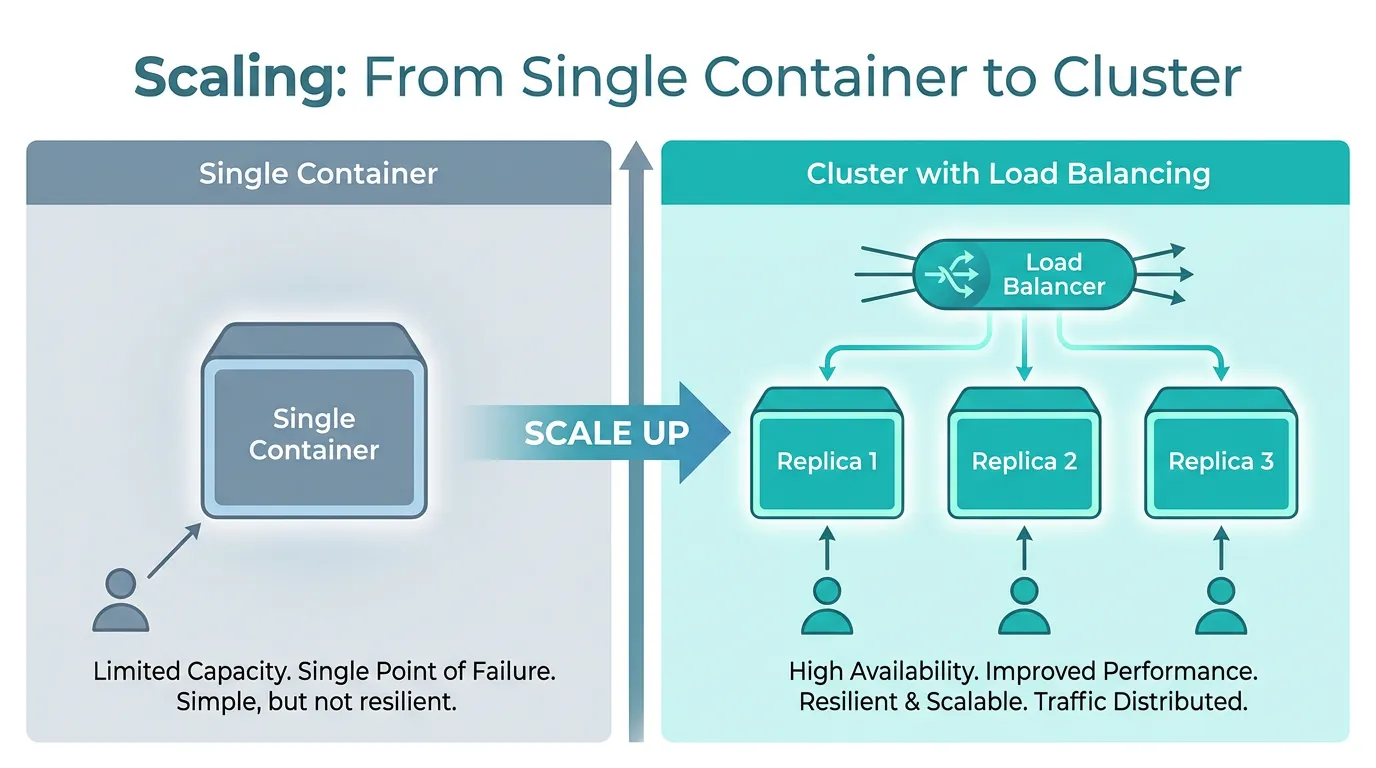
None of that requires abandoning the Dockerfile above — it's the same image, just run by something that can manage more than one copy of it. If the next step for your team is exactly that move, this guide on moving that same container onto Kubernetes walks through the Docker Compose to Kubernetes path end to end, including the parts — ingress, shared caching, rolling updates — that a single docker run command doesn't give you for free.
The short version
A Next.js web application in production is: a build that separates static assets from server code, a rendering mode that decides whether that server code runs per-request, a standalone output that turns the server into something you can containerize without shipping your whole repo, and — past a certain point — more than one copy of that container running behind something that can manage them. Get the first three right locally with Docker before you worry about the fourth; the image doesn't change when you add replicas, only what's running it does.