
COLUMN
Next.js Health Checks and Graceful Shutdown in Docker
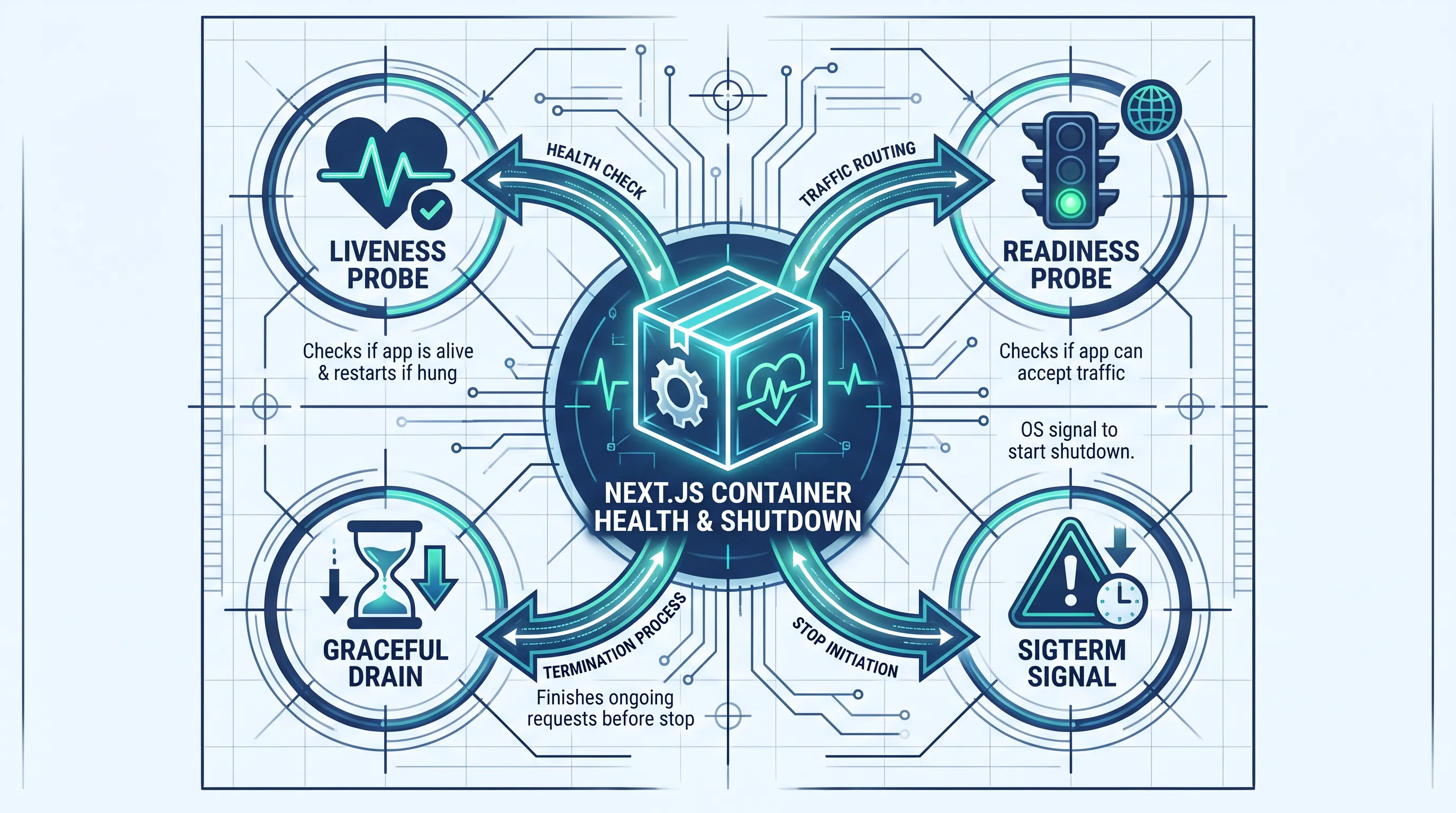
Every rolling deploy asks two questions of your Next.js container: is it alive, and is it ready to stop? Get either answer wrong and you either serve traffic to a broken instance or drop in-flight requests when the old one goes down. This guide covers both sides — health check endpoints and signal handling — for a self-hosted Next.js app running in Docker.
Why "it returns 200" isn't a health check
A health check endpoint that always returns 200 OK tells you the process is running, not that it can serve traffic. Most orchestrators — Kubernetes, a cloud load balancer, Docker Swarm — act on the HTTP status code alone, not the response body. If your handler returns 200 with { ok: false } in the JSON, every monitor watching it sees a success.
The fix is to separate two questions that get conflated into one endpoint:
- Liveness — is the Node.js process still running and able to respond at all? This should almost never fail unless the process is deadlocked or out of memory.
- Readiness — can this instance currently serve real traffic? This can legitimately fail — a downstream database is unreachable, a cache warm-up hasn't finished — without meaning the process itself is broken.
Collapsing these into one check causes a specific failure mode: your database goes down, the combined health check returns 503, Kubernetes reads that as a liveness failure, and it restarts every pod in a loop while the database is still down. Restarting the app doesn't fix the database, so you've added churn on top of an outage.
Building the endpoints
In the App Router, a health check is just a route handler:
// app/api/healthz/route.ts
export async function GET() {
  return Response.json({ status: 'ok', uptime: process.uptime() })
}
That's enough for liveness — it only fails if the process can't respond to HTTP at all. Readiness needs a second, separate route that actually checks the things that matter for serving traffic:
// app/api/readyz/route.ts
import { db } from '@/lib/db'

export async function GET() {
  try {
    await db.query('SELECT 1')
    return Response.json({ status: 'ready' })
  } catch {
    return Response.json({ status: 'not-ready' }, { status: 503 })
  }
}
The status code is what makes this work — 503 Service Unavailable when something you depend on isn't reachable, 200 when it is. Don't encode the result only in the JSON body; whatever probes your health check, it's almost certainly reading the status line.
Wiring it into Docker
A HEALTHCHECK instruction lets Docker itself track container health, which shows up in docker ps and is what tools like Docker Swarm and some load balancers act on:
HEALTHCHECK --interval=30s --timeout=3s --start-period=10s --retries=3 \
  CMD wget --no-verbose --tries=1 --spider http://localhost:3000/api/healthz || exit 1
--start-period matters more than it looks: it gives the container a grace window after startup before failed checks count against --retries. Without it, a Next.js app that takes a few seconds to boot can be marked unhealthy before it's finished starting.
If you're deploying to Kubernetes instead of relying on Docker's own healthcheck, map the same two endpoints to livenessProbe and readinessProbe — they're different fields for a reason:
livenessProbe:
  httpGet:
    path: /api/healthz
    port: 3000
  initialDelaySeconds: 10
  periodSeconds: 10
readinessProbe:
  httpGet:
    path: /api/readyz
    port: 3000
  initialDelaySeconds: 5
  periodSeconds: 5
  failureThreshold: 3
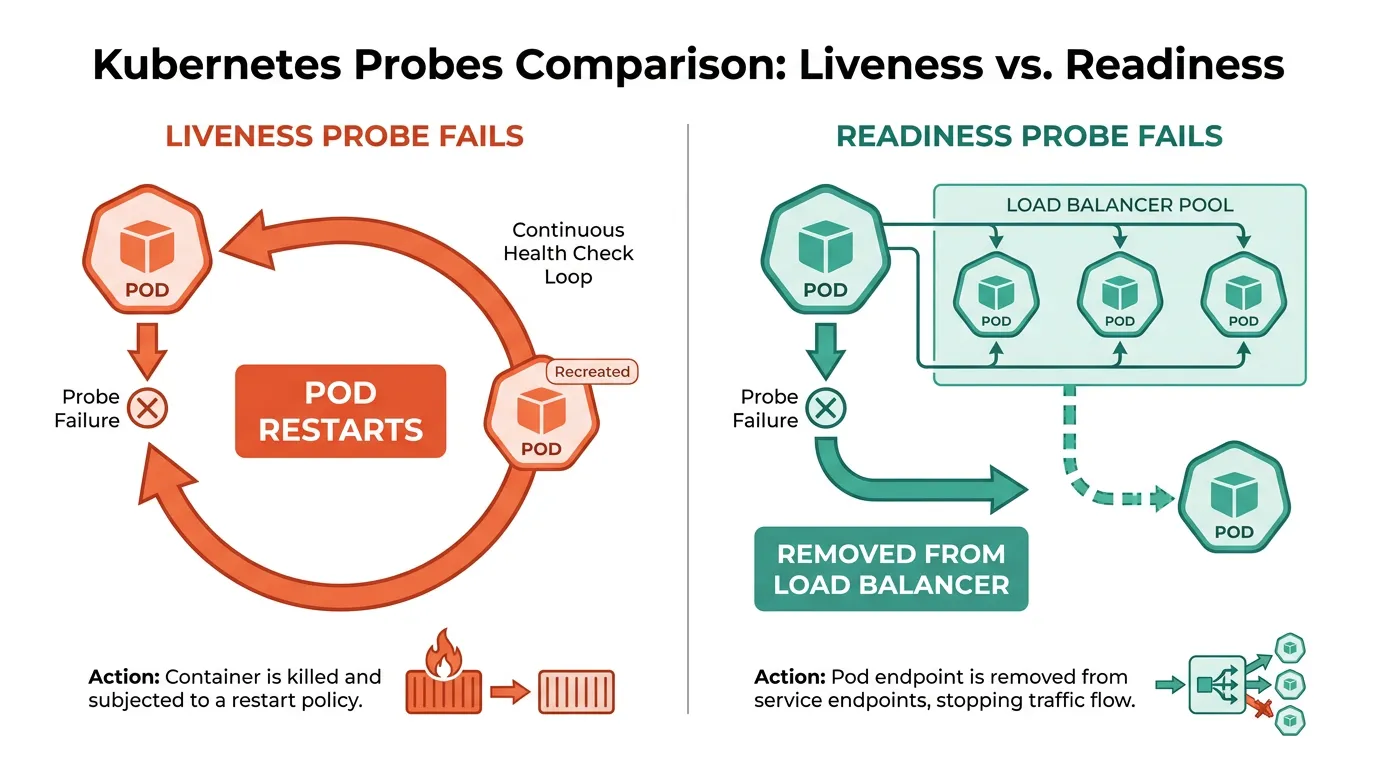
A failed livenessProbe restarts the pod. A failed readinessProbe just pulls it out of the load balancer's rotation until it passes again. That distinction is exactly what avoids the restart-loop failure mode described above.
The other half: graceful shutdown
Health checks only prevent traffic from going to a broken instance. They don't prevent traffic from being dropped when a healthy instance is told to stop — which happens on every single deploy. That's a signal-handling problem, not a health-check problem.
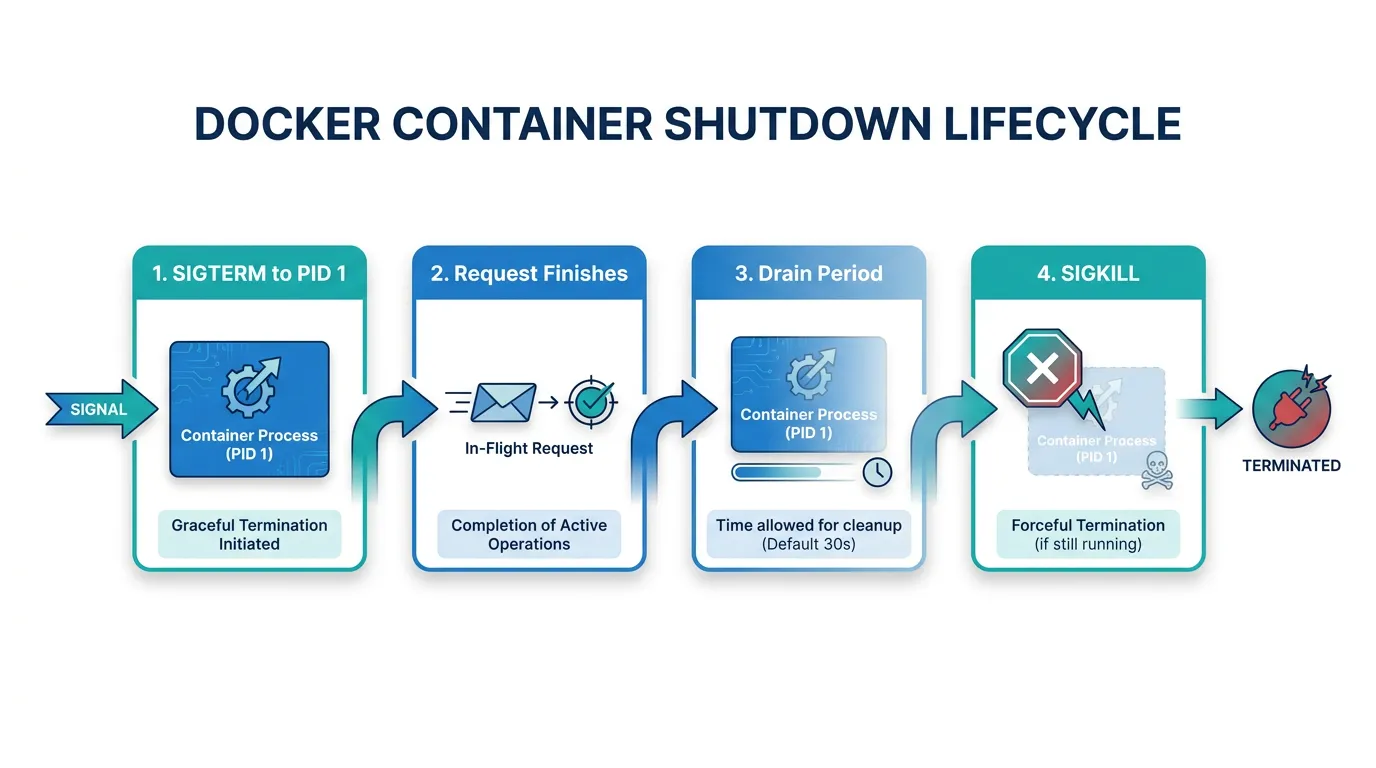
When a container stops, Docker sends SIGTERM to PID 1 in the container, waits for the default stop timeout, then sends SIGKILL if the process hasn't exited. If your CMD is written in shell form (CMD next start), a shell process becomes PID 1 and Node.js runs as its child — the shell receives SIGTERM, but doesn't necessarily forward it to Node. Use exec form so Node itself is PID 1 and receives the signal directly:
CMD ["node", "server.js"]
According to the official Next.js self-hosting guide, when you send SIGINT or SIGTERM to a next start process, Next.js finishes in-flight requests and runs any pending after() callbacks before exiting — and the guide recommends giving it a 10-30 second drain period rather than killing it immediately. That drain period is what a rolling deploy needs to respect: stop routing new traffic to the old instance, then wait before force-killing it.
Standalone output (output: 'standalone' in next.config.js) has had a rougher history here. A previously reported issue showed the generated server.js skipping the same signal-forwarding check the normal next CLI applies, so custom shutdown logic added via NEXT_MANUAL_SIG_HANDLE silently never ran. It was fixed, but it's the kind of regression that's easy to reintroduce and easy to miss in a staging environment where nothing sends real traffic during a deploy — the safest thing is to verify it yourself:
docker run -d --name check .next-standalone-test
docker stop -t 20 check
docker logs check
If your app logs a shutdown message and in-flight requests complete before the container exits, signal handling is working. If the container just disappears at the 20-second mark with no log, SIGTERM isn't reaching your handler.
Making the drain period actually work
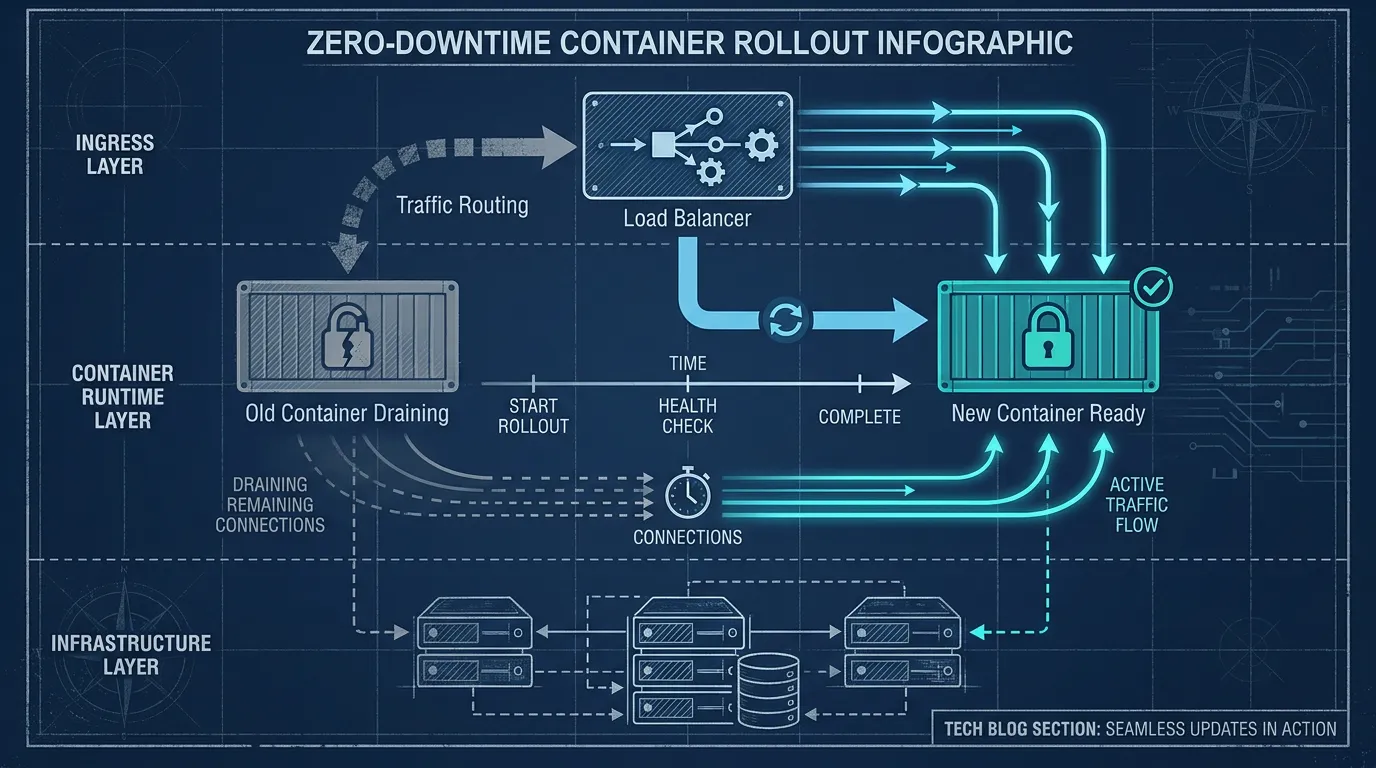
None of this matters if the load balancer or ingress in front of your containers keeps sending new requests to an instance that's already draining. The sequence that avoids dropped requests looks like this:
- Deploy signals the old instance to stop.
- The instance is removed from the load balancer's healthy pool — this is exactly what a failing
readinessProbe(or an equivalent Docker/Swarm health state) accomplishes. SIGTERMreaches the Next.js process directly (exec-formCMD, working signal forwarding in standalone mode).- Next.js finishes in-flight requests and pending
after()work within the drain window. - Only after the drain window does the orchestrator send
SIGKILL.
Steps 2 and 3 are two different mechanisms — one keeps new requests away, the other lets existing requests finish — and skipping either one reintroduces dropped requests even if the other is configured correctly. This is also where automating container deployments with GitLab CI/CD pays off: a pipeline that always deploys through the same rollout sequence removes the chance of a one-off manual deploy skipping the drain step.
There's a networking piece too. If your health check hits localhost:3000 from inside the container, that only proves the process is listening on its own loopback interface — it says nothing about whether traffic can actually reach the container from the load balancer or from other services. It's worth understanding how Docker's network modes affect container-to-container connectivity before assuming a passing internal health check means the container is reachable in production.
This is exactly the kind of plumbing that self-hosting hands you by default — probes, signal forwarding, and rollout sequencing are all things you'd otherwise get for free from a platform. Kubo runs your containers on standard Kubernetes with readiness and liveness probes, and rolling deployments already wired in, so you're configuring the same livenessProbe/readinessProbe fields shown above rather than re-deriving the whole sequence per project.
Summary
A health check endpoint and a signal handler solve two different problems, and treating them as one endpoint is where most of the dropped-request incidents start:
- Split liveness (is the process alive) from readiness (can it serve traffic) — and return real HTTP status codes, not just JSON fields
- Run your Next.js process as PID 1 with exec-form
CMDsoSIGTERMactually reaches it - Give it Next.js's own recommended 10-30 second drain window before anything sends
SIGKILL - Verify standalone output's signal handling directly with
docker stop -t, don't assume it from the docs alone
If you're weighing how much of this to build and maintain yourself versus how much to get from the platform, see how to automate the deploy pipeline itself — it's the next piece once health checks and graceful shutdown are in place.