
COLUMN
Why Self-Hosted Next.js Deploys Throw ChunkLoadError (and What deploymentId Fixes)
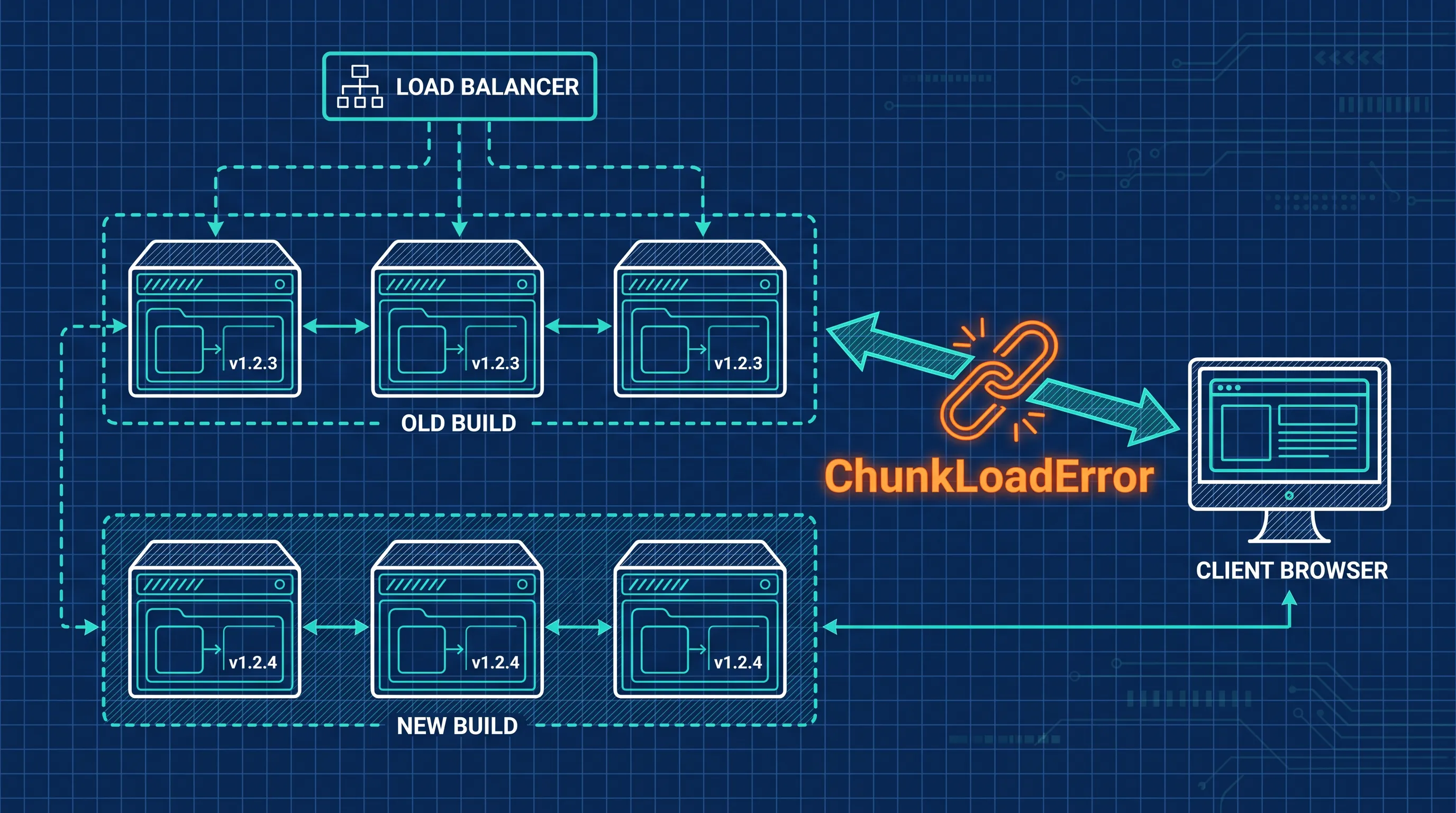
Ship a new build while even one user has the old page open, and Next.js can throw ChunkLoadError mid-session — the build succeeded, the deploy succeeded, and a real user still hit a broken navigation. If you're self-hosting on more than one instance, this isn't a rare edge case; it's a predictable side effect of how Next.js identifies a build, and there's a specific, documented config option that fixes it.
Why the Error Happens at All
Every time you run next build, Next.js generates a build ID and uses it to name the JavaScript and CSS chunks under /_next/static/. A page you load in your browser holds references to that build's chunk paths. If you click a link and the app does a client-side navigation, the browser requests the chunk for the next route by that exact path.
The problem shows up the moment the server behind that request no longer has the old build. On Vercel, each deployment's static assets stay reachable even after a newer deployment goes live, so an older client session can keep fetching its own chunks. Most self-hosted setups don't do this automatically: a fresh next build in the same container, or a new container replacing an old one in a rolling deploy, means the old chunk paths simply stop existing on whichever instance answers next.
Where Multi-Instance Deployments Make It Worse
A single self-hosted instance limits the damage to the window between "new build finishes" and "old process stops." Running more than one instance stretches that window into an ongoing state, not a brief moment.
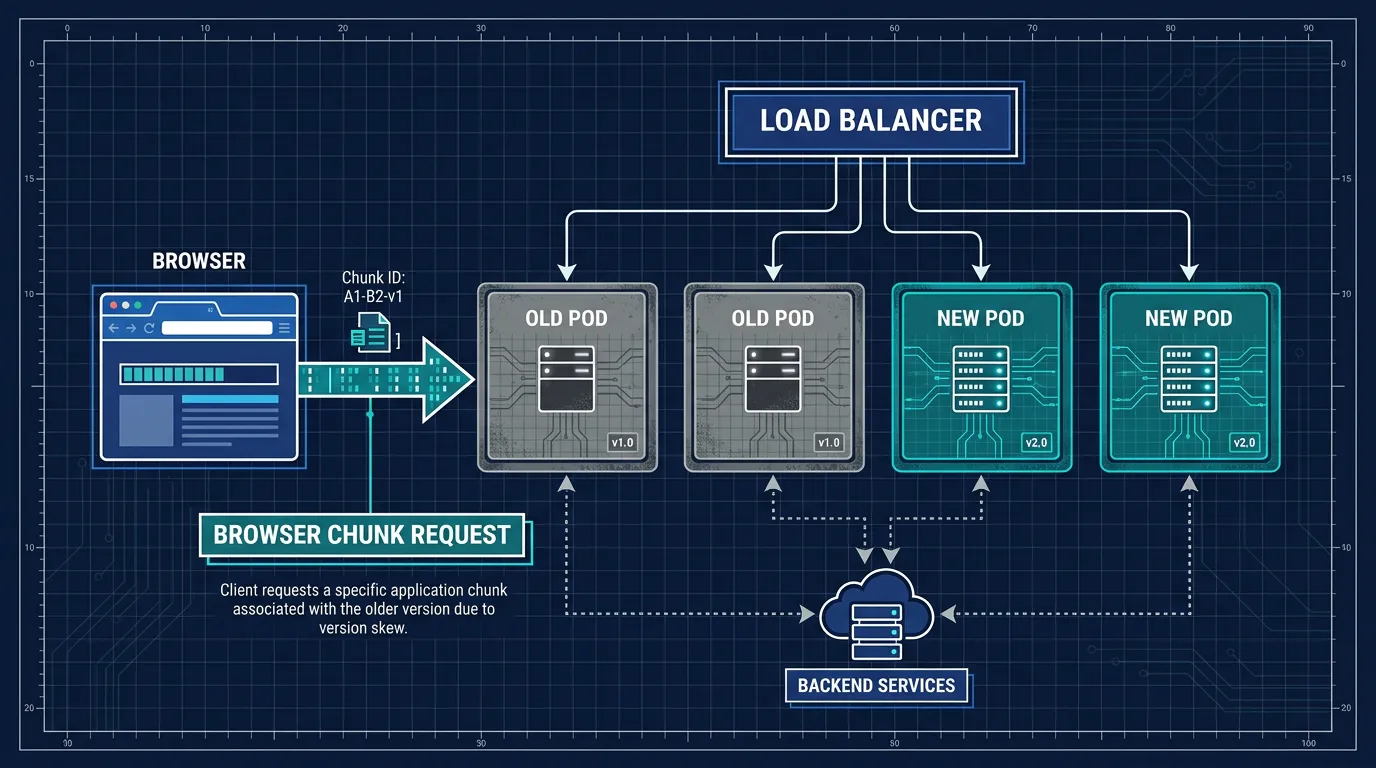
During a rolling deployment, old and new instances serve traffic side by side behind the same load balancer for as long as the rollout takes. A user's session isn't pinned to one instance — one request can hit an old pod, and the next can land on a new one. According to Next.js's official self-hosting guide, this kind of inconsistency between what a client expects and what a server can provide is called version skew, and it can cause three distinct failures, not just missing chunks:
- Missing assets — the client requests JavaScript or CSS files that no longer exist on the server it happens to reach
- Server Function mismatches — the client invokes a Server Function using an ID from a previous build that the current server doesn't recognize, surfacing as a "Failed to find Server Action" error
- Navigation failures — prefetched page data from an old deployment is incompatible with the new server's response shape
This gets worse the moment you run more than one instance: during a rolling deploy, old and new pods serve traffic side by side, so some users are talking to a server that no longer has the assets their browser expects. Kubo runs standard Kubernetes underneath, so the same rollout controls — and the same fix below — apply whether you're on a managed cluster or your own servers.
The Fix: deploymentId
Next.js has a built-in mechanism for exactly this, documented as version skew protection. You set a deploymentId in next.config.js, typically derived from something unique to each deploy — a CI build number, a Git SHA, or a timestamp:
// next.config.js
module.exports = {
  deploymentId: process.env.DEPLOYMENT_VERSION,
}
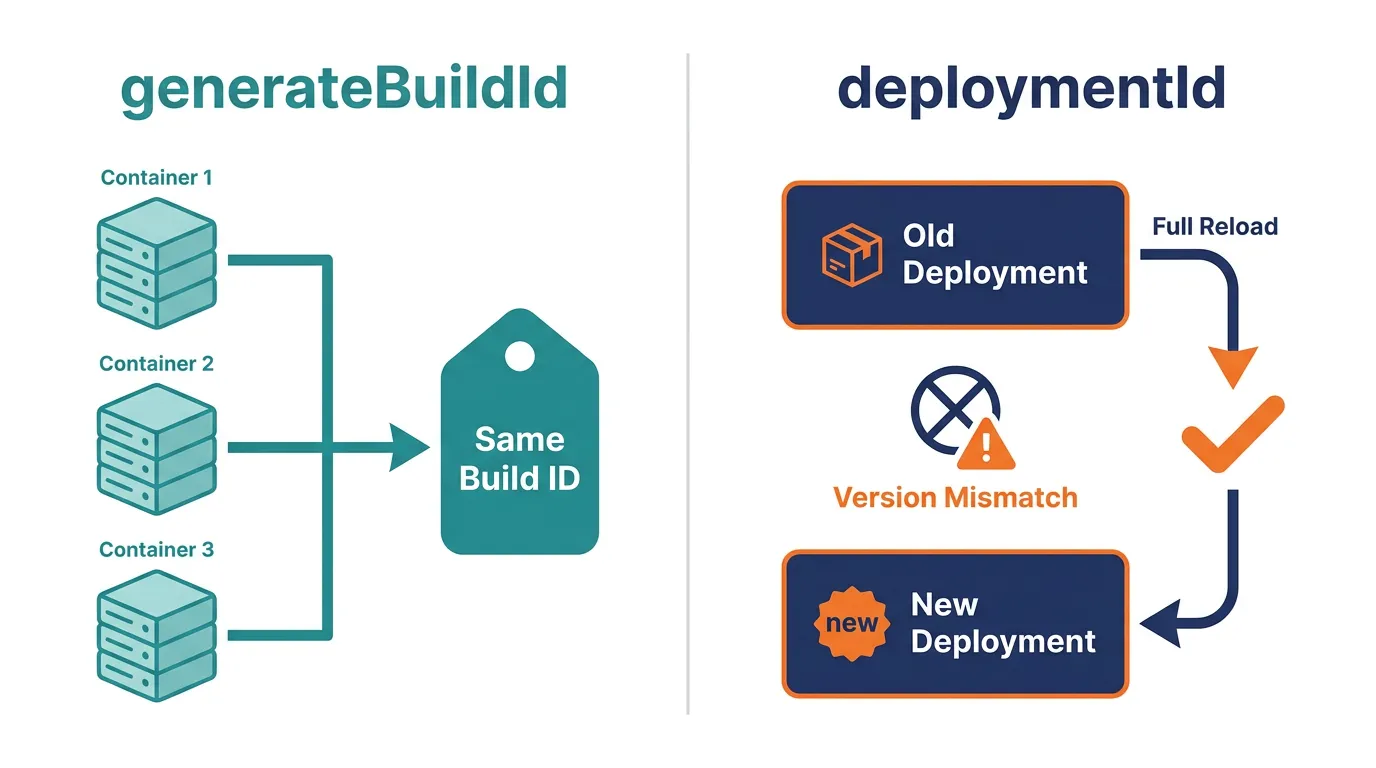
Once configured, Next.js changes how it identifies requests in two ways: static asset URLs get a ?dpl=<deploymentId> query parameter, and client-side navigation requests carry an x-deployment-id header. The server compares the deployment ID it receives against its own. When they don't match, Next.js doesn't try to patch the client-side navigation — it triggers a full page reload instead of a soft, client-side transition. That reload fetches a fresh page from whichever instance answers, with the correct assets and no half-updated state.
The trade-off is honest, not hidden: a hard reload can lose in-memory state that wasn't already persisted. Anything sitting in useState or component state disappears; anything already in the URL or localStorage survives, because those aren't cleared by a page reload. For most apps, a full reload after a genuine version mismatch is a reasonable price for not showing a broken screen.
generateBuildId Solves a Different Half of This
It's worth being precise about what deploymentId replaces, because there's an older, related option that solves a narrower problem: generateBuildId. Without it, Next.js generates a random build ID on every next build, which is a problem the moment you build once per container in a multi-container deployment — each container would get its own ID and disagree with the others even though they're running identical code.
// next.config.js
module.exports = {
  generateBuildId: async () => {
    // e.g. the current git commit hash
    return process.env.GIT_HASH
  },
}
generateBuildId keeps multiple containers from the same build agreeing with each other. It does nothing for the transition between an old build and a new one — that's specifically what deploymentId and its version-skew detection handle. If deploymentId is set, Next.js uses a constant build ID and generateBuildId has no effect, since version skew is detected from the deployment ID instead.
Streaming and Buffering Need Attention Too
Version skew is the headline issue, but it's not the only place self-hosted, multi-instance Next.js diverges from what Vercel handles for you. If your app uses streaming responses — Suspense boundaries, Partial Prerendering — a reverse proxy like nginx sitting in front of your instances needs buffering disabled for that specific traffic, or streamed output arrives all at once instead of progressively, which quietly removes the time-to-first-byte benefit you were counting on. This isn't hypothetical; it's exactly the kind of thing that works perfectly in local development against a single Node process and only shows up once real infrastructure — a load balancer, a proxy, multiple pods — sits in between.
That's the pattern behind most of these self-hosting gaps: the failure mode only exists once you have more than one instance and something orchestrating traffic between them. Kubernetes' rolling update model is built around exactly that shape — old and new pods coexisting during a rollout — which is why the config on the Next.js side and the rollout strategy on the infrastructure side need to agree with each other.
Getting the Rollout Strategy Right, Not Just the Config
Setting deploymentId stops the symptom — the broken navigation a user would otherwise see. It doesn't manage how the rollout itself proceeds: how many old pods stay up while new ones start, how fast traffic shifts, or what happens if the new build is broken and needs to roll back. That's a deployment-orchestration problem, and it's worth pairing with a workflow instead of leaving it to whatever your infrastructure does by default.
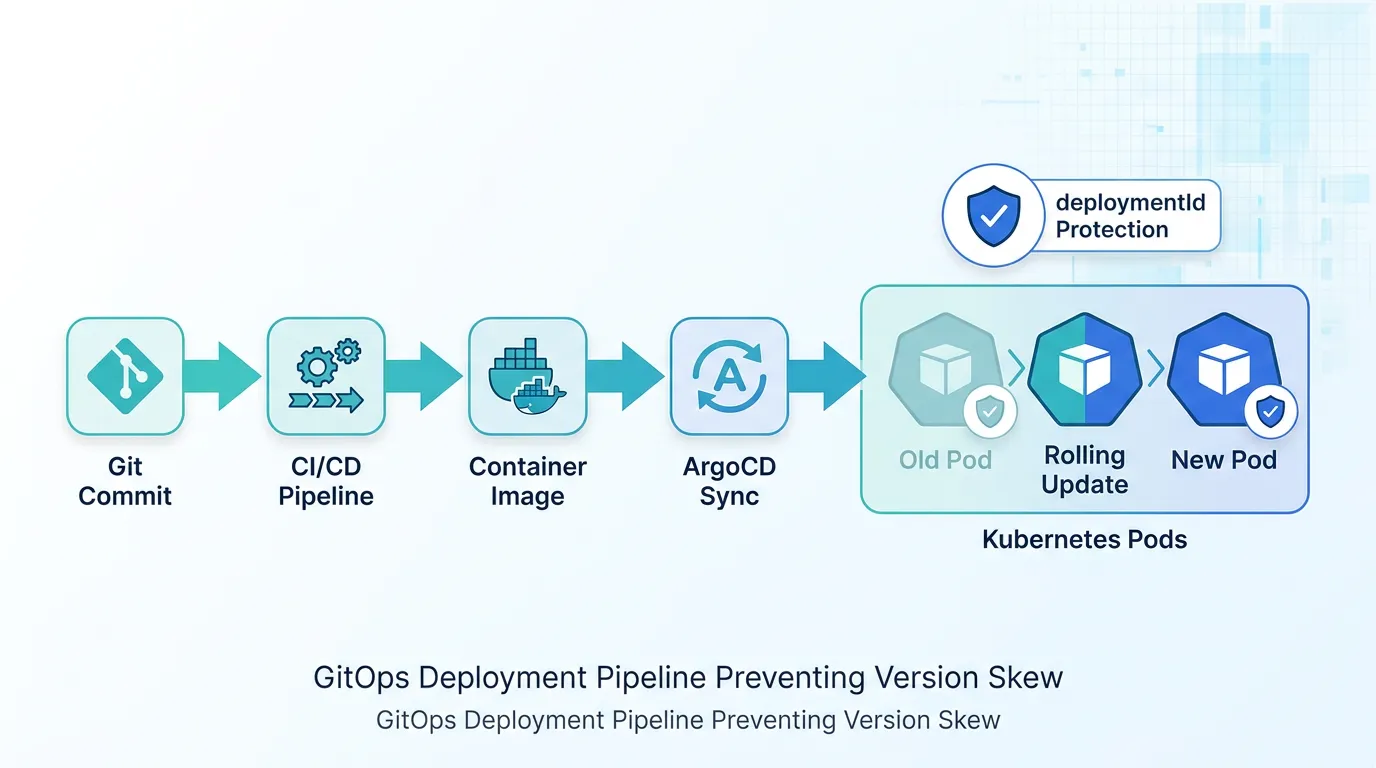
A GitOps workflow like ArgoCD is a common way to make that rollout predictable and repeatable: the desired state of your deployment lives in a Git repository, and the rollout — including how many pods update at a time — is driven from there instead of a person running kubectl commands by hand during a release. If your CI is already building and testing the image, automating the deployment with GitLab CI/CD or building that pipeline with GitHub Actions covers the step of getting a tested image from a registry into that rollout in the first place.
Conclusion
ChunkLoadError after a deploy isn't random flakiness — it's version skew, a documented consequence of how Next.js identifies builds, and it gets more frequent the more instances you run. generateBuildId keeps containers within one deployment consistent with each other; deploymentId is the piece that actually detects a mismatch between an old deployment and a new one and forces a clean reload instead of a broken navigation.
deploymentId fixes the client-server mismatch, but it doesn't manage the rollout itself — pairing it with a GitOps workflow like ArgoCD is what makes the whole rolling deploy predictable.